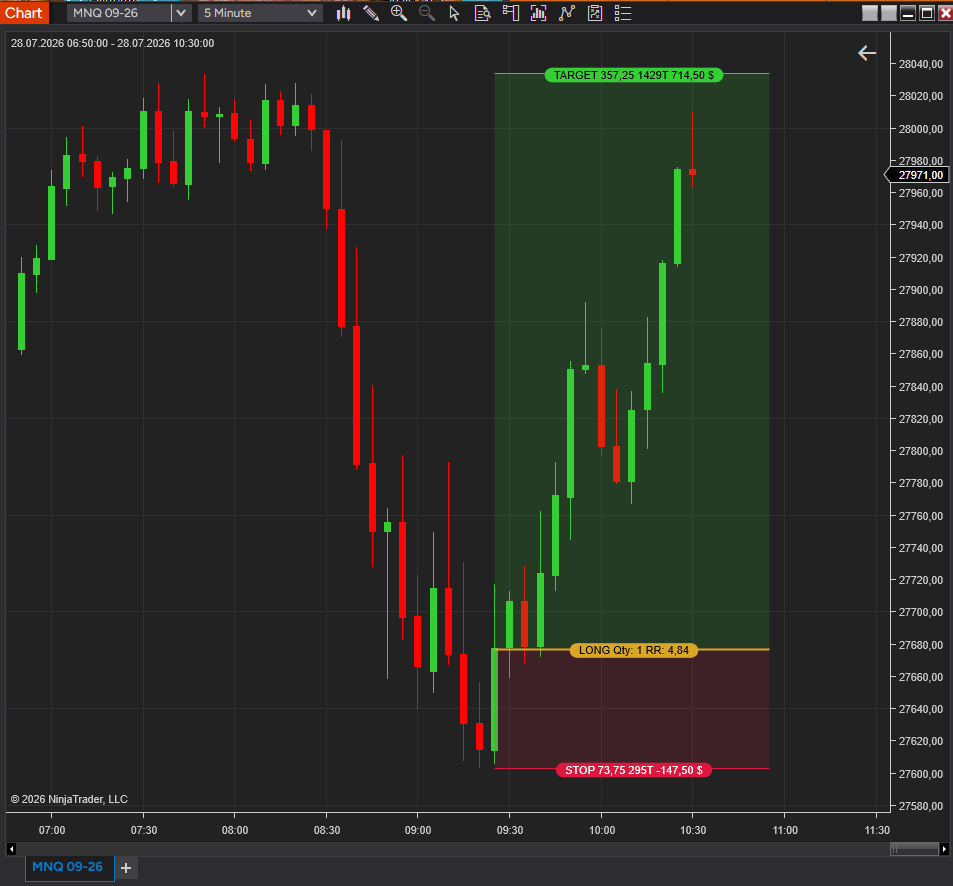
Draws your entry, stop-loss, and profit-target directly on the chart and calculates position size in real time — fixed contracts or risk-based off a dollar risk-per-trade you set, updated live as you drag the anchors.
$19
1-day trial · Full version · No signup required
Entry, stop-loss, and profit-target anchors on the chart — range, quantity, dollar risk, estimated commission, and R:R calculated and displayed live as you drag.
Set a fixed contract count, or size off a dollar risk-per-trade — the tool works the math from your stop distance automatically.
Right-click the drawing and submit the entry — stop-loss and profit-target orders go out with it, no separate order entry.
Fills, cancels, and OCO behavior are handled automatically as the position opens and closes — nothing to babysit.
Line colors, zone fill opacity, text font, alignment, and visibility are all configurable per drawing.
Sim or live, no extra configuration required to switch between them.
Most position-size math happens off the chart — a separate calculator, a spreadsheet, or a guess. By the time you've done the math, the setup has moved.
Trade Setup Tool keeps the whole plan on the chart: drag the entry, stop, and target anchors, and the size, dollar risk, and R:R update live next to the drawing. When the setup is right, right-click and submit — the bracket order goes out with stop and target already attached and auto-managed.
Typical use: visually planning a trade before it's live, confirming size and R:R against your own risk rules, then executing without leaving the chart.
Download the .zip file (trial or full version from Gumroad).
In NinjaTrader 8: Tools → Import → NinjaScript Add-On, select the .zip.
Restart NinjaTrader and add Trade Setup Tool to any chart from the Drawing Tools menu.
Full version: send your Machine ID after purchase — activation is confirmed the same day, then restart NT8.
Both. It's a drawing tool by default — nothing is sent to your account until you right-click and choose "Submit Entry Order." Until then it's just a visual plan.
They're submitted alongside the entry as a bracket and managed automatically — when one side fills or is cancelled, the other is cancelled with it.
Fixed Contracts always sends the same size. Risk Based divides your risk-per-trade ($) by the stop distance to size the position for you, recalculated live as you move the stop.
Yes, it works with any connected account, Sim or live, with no additional configuration.
The trial is the full version, limited to 1 day. No signup, no email required.
Draw entry/stop/target, auto-size the position, submit as a bracket order — one click · Lifetime license · Support included

NinjaTrader Ecosystem Vendor.
Risk Disclosure: Futures and forex trading contains substantial risk and is not for every investor. An investor could potentially lose all or more than the initial investment. Risk capital is money that can be lost without jeopardizing one's financial security or lifestyle. Only risk capital should be used for trading and only those with sufficient risk capital should consider trading. Past performance is not necessarily indicative of future results.
NinjaTrader® is a registered trademark of NinjaTrader Group, LLC. No NinjaTrader company has any affiliation with the owner, developer, or provider of the products or services described herein, or any interest, ownership or otherwise, in any such product or service, or endorses, recommends or approves any such product or service.